
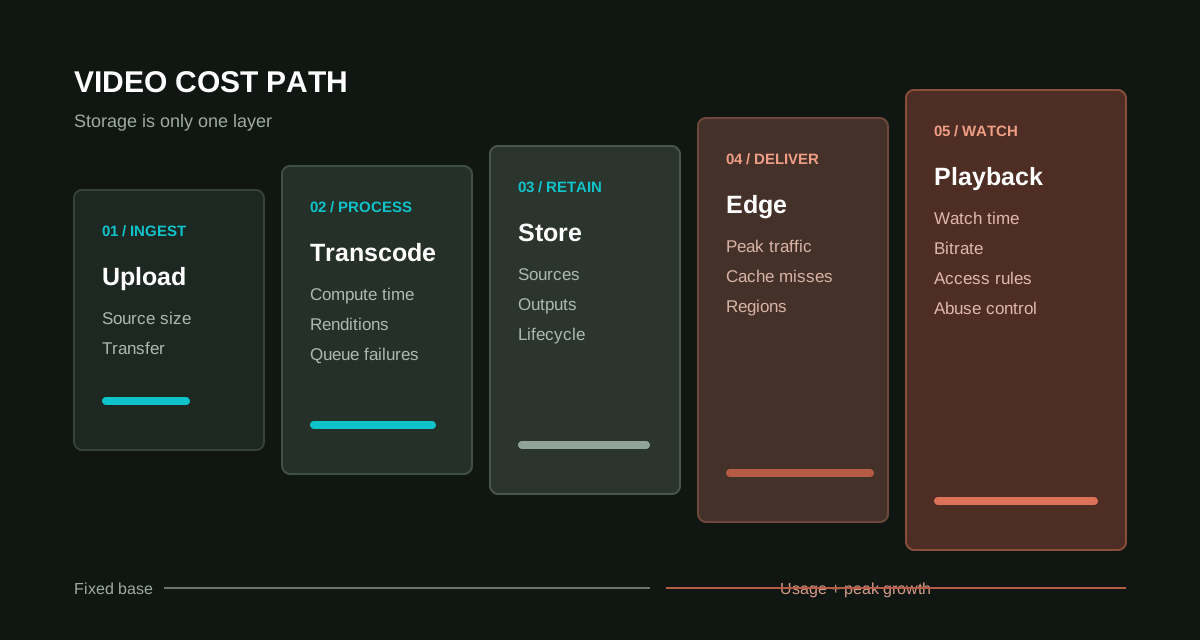
Because video files are large, teams often look first for the lowest storage price. But video cost also comes from transcoding, playback compatibility, peak bandwidth, access control, analytics, and abnormal download handling. The right location depends on content purpose.
Your own server fits small trials
A few low-traffic public videos can run from a server during early validation. Watch bandwidth, range requests, interrupted playback, backups, and traffic peaks. A web directory is rarely a good long-term video library.
Object storage fits files and downloads
Object storage is useful for sources, renditions, thumbnails, captions, and archives. With CDN it can support downloads and basic playback. Adaptive bitrate, analytics, DRM, and advanced review require additional services.
Video platforms fit complex viewing businesses
Courses, membership video, live replay, and high concurrency often fit a video cloud or dedicated platform. These provide templates, players, access control, analytics, and hotlink protection. The tradeoff is provider dependence and recurring cost, so preserve sources and metadata for exit.
| Route | Fits | Watch |
|---|---|---|
| Own server | Few public videos | Bandwidth, backup, peaks |
| Object storage + CDN | Downloads, VOD files, archives | Permissions and transcoding |
| Video platform | Courses, members, live replay | Recurring cost and exit plan |
Ask whether the content needs control
Promo clips need smooth access, internal training needs audience control, paid courses need sharing limits, and archives need retention. Separating those goals prevents a single unit price from misleading the architecture.